
“Real” vs. “Virtual” Staging
Staging a home well invariably involves lots of fine-tuning and not a little trial-and-error.
So, sofas get moved around, art work get hung (then removed, then re-hung), Oriental rugs get deployed in various locations, etc.
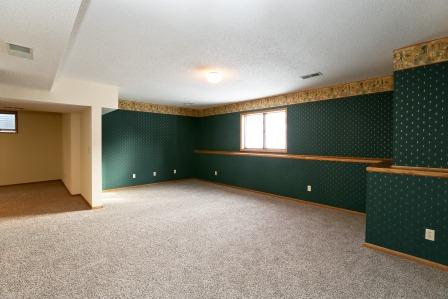
Unbeknownst to home Buyers and Sellers, the same process applies to what’s called “virtual staging” — that is, using software to show what an 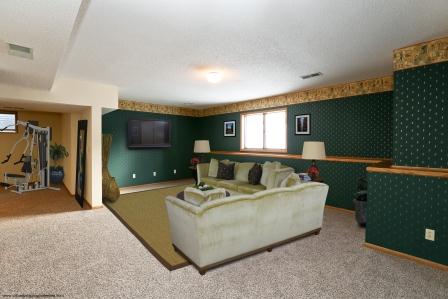 empty room would look like furnished and accessorized.
The key difference?
With virtual staging, that process happens completely online.
Virtual Staging, Virtual Editing
Exhibit A would be the lower level Amusement Room in a Plymouth home that I’m listing next week.
The top photo shows how the room currently looks empty.
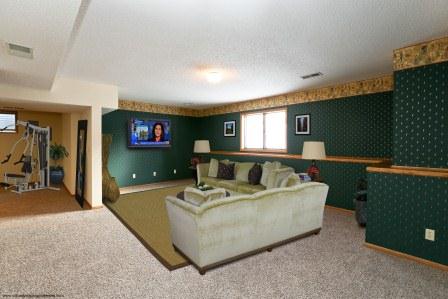 Photo #2 shows the room virtually staged, but with a “hiccup”: the (virtual) TV on the back wall is off, and therefore black . . and therefore nearly invisible against the dark green wallpaper.
The solution?
Turn the TV on — virtually, that is.
Which is exactly what the software folks did in the new-and-improved (and final version) of the Amusement Room photo, above.
Pretty cool, huh??
See also, “Virtual Staging Success Story“; “Virtual Staging — Take 2“; “Virtual Staging – Take 3“; “Virtual Staging, Installment #4“; “Unmatched Potential“; and “Create Your Dream Home on Fern Hill’s Glenhurst Ave.”
P.S.: Note the exercise equipment in the adjoining room (center left of the last two photos).
